STAGE · Before you begin
Menus and screens
Draft — Draft: checked against the game source, not yet read through end to endAvailable from the startFind your journal, growth pages, possessions, settings and maps without searching every menu.
This page is further along your path. Read ahead if you’re curious; you can return when you reach this stage.
Choose a door
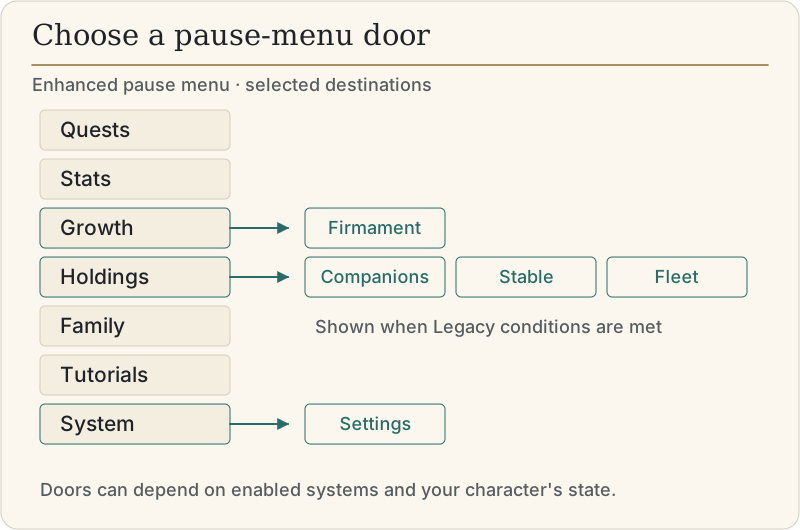
The table describes the enhanced pause menu. Its tabs are Quests, Stats, Growth, Holdings, Family, Tutorials and System. The Family tab appears only when its Legacy conditions are met. Other pages can depend on the current host, enabled systems or what your character has to show.
Classic uses a different pause window. Direct Professions and Legacy Family actions open enhanced pages on either skin.
| Door | Key/path | What it holds |
|---|---|---|
| Journal and quests | L; pause → Quests | Accepted quests, questlines and pending quest reward choices |
| Notebook | N | Your notebook |
| Pack | F6; pause → Stats → Pack when offered | Inventory and equipment |
| Character | F5; pause → Stats | Character, attributes, skills, advantages, standing and effects |
| Firmament | Pause → Growth → Firmament | Your online star tree |
| Specialisations | Pause → Growth → Specializations | The mastery-path guide; the UI uses the spelling “Specializations” |
| Masteries | Growth's Master Skills door; Stats → Master Skills button | Master Skills state and choices; the resulting page belongs to Stats |
| Professions | Down Arrow off a ship's helm; pause → Stats → Professions | Profession progress and pages online |
| Stores | Pause → Holdings → Stores | Profession storage online |
| Mounts and carts | Pause → Holdings → Stable | Horse and wagon status and available management actions |
| Ships | Pause → Holdings → Fleet | Your ships and available fleet actions |
| Companions | Pause → Holdings → Companions | Sworn companions and their management |
| Homes | No general Homes page in the checked Holdings rail | Do not search Holdings for a home-management screen |
| Legacy family | Pause → Family; Numpad / when enabled | Family tree, house and Hall of Ancestors; a separate tab from Holdings |
| Settings | Pause → System → Settings | Controls, Accessibility, Graphics, Gameplay and other settings tabs |
| Local map | M | AutoMap for your nearby surroundings |
| Travel map | V | TravelMap for travel destinations |
| Overworld | TravelView action; no default key | The separate Overworld Travel View |
The two maps
Use AutoMap for local orientation. Its default action is M. Use TravelMap, bound to V, when choosing places across the Bay. The map and danger later explains how to read places and danger before you set out.
The Overworld Travel View is separate. Its TravelView action ships unbound. Check Controls for your assigned binding, then follow Overworld travel later for route planning. Open map windows have their own controls.
Settings
Open System → Settings → Controls → Key bindings to inspect and change your bindings. These pages describe shipped defaults; saved personal bindings may differ.
Accessibility groups its options under Motion, Readability, Danger shapes and Large status bar. The source includes head bobbing, camera recoil and reduced motion under Motion, and font rendering and health/fatigue colour swapping under Readability.
Interface skins live under Overhauls → UI Overhaul, rather than Controls. Follow Interface and skins for the available looks and the reload involved in changing one.
Common mistakes
Pressing Esc expecting to quit: it opens pause, or closes the overlay already in front of you.
Confusing M and V, or expecting V to open the unbound TravelView action.
Looking for the Firmament on Stats or Holdings instead of Growth.
Next
Sources & checked facts
src/ui/enhanced/enhancedMenu.js:PAUSE_TABS,pauseQuests,pauseGrowth,pauseHoldings,pauseFamily,pauseStats,holdingsSections,SYSTEM_PANES, Master Skills doorssrc/ui/pauseDoor.js:openPauseFlow, skin fork and direct-page landingssrc/ui/growth/growthTab.js:LABEL,drawGrowthTab,openMastersrc/ui/holdingsPages.js:holdingsProvider,stablePageShown, Stable/Fleet responsibilitiessrc/ui/input.js:routeAction, overlay close and pause routing, Professions/LegacyFamily landingssrc/systems/inputActions.js:DEFAULT_BINDINGS,DEFAULT_SHARES, TravelView and action labelssrc/ui/settings/settingsMap.js:CATEGORIES, Accessibility sections and Controls bindingshandbook/content/begin/interface-and-skins.md: skin path and its cited UI/Overhauls sourcesdocs/35-people-and-trouble.md: Interface essentials (secondary orientation note)